
#1 SEO ecommerce AI Tool
To scale further, faster
Optimize your product listing SEO in minutes to rank higher, reach the right buyers, and sell more.
Supported Platforms:




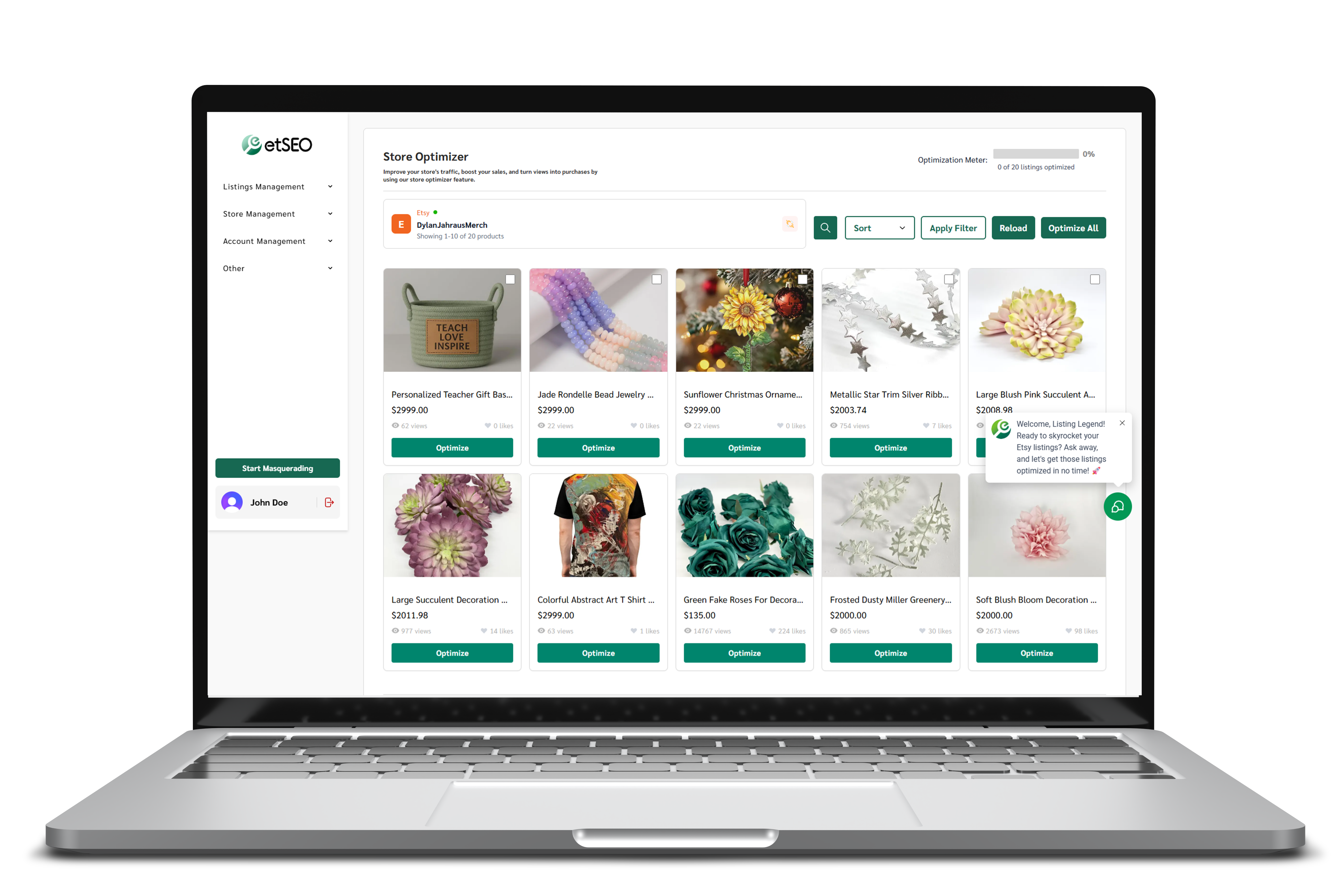
Optimize, update, and expand your listings faster than ever.
etSEO turns product photos and simple prompts into optimized listings built to help you rank higher, reach better buyers, and grow across platforms.
Get your products in front of the right people.
Optimized listings help more buyers find your products, giving every listing a stronger chance to get seen, clicked, and purchased.
Create New Optimized Listings In Seconds
Upload a product photo, answer a few chatbot questions, and save your optimized listing directly to your shop.
Save + Review Your Listing History
Reposition listings for different profitable customers and keep every version organized inside etSEO.
Manage Your Optimization Dashboard
Mass update, optimize, and improve your shop listings from one clean dashboard.
Sync Across E-Commerce Platforms
Move listings to another platform without learning a whole new set of SEO rules.
etSEO, Will Instantly Helps You With:
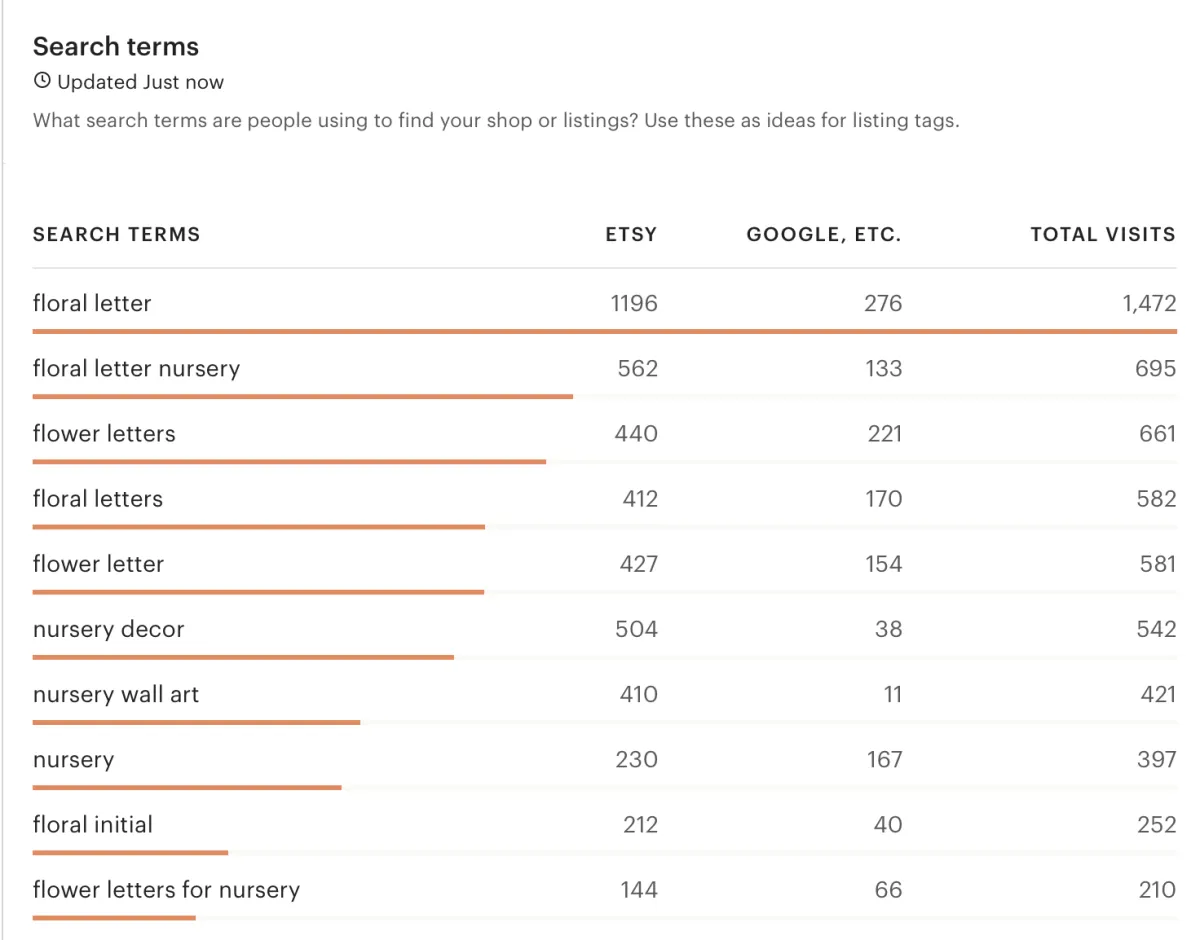
Smart Keyword Optimization
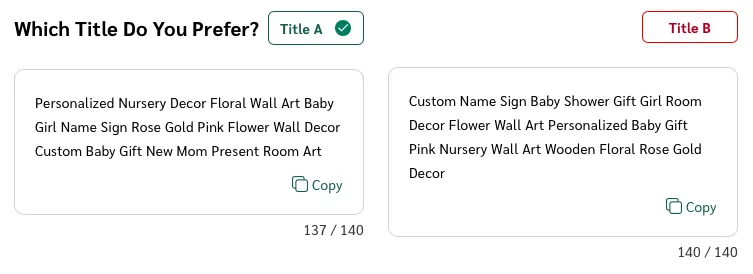
etSEO automatically generates optimized titles, descriptions, tags, and alt text that are designed to match every e-commerce platform's search engine preferences. These elements are customized based on trending keywords and buyer behavior to ensure your listings stand out in search results.
Turning Clicks Into Customers
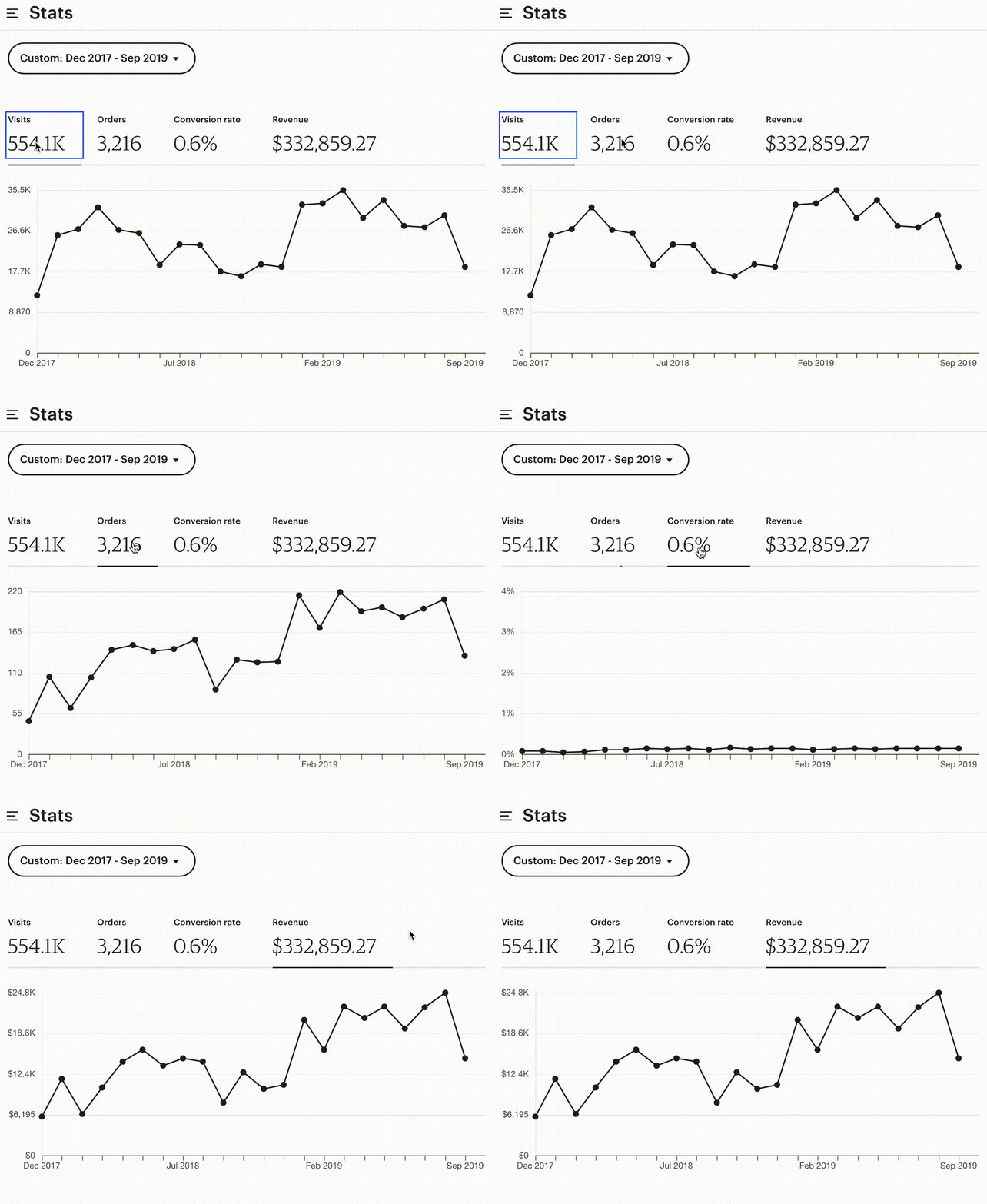
etSEO takes SEO beyond basic keyword matching by incorporating insights like conversion rates, average order values, and buyer intent. This deeper level of optimization ensures your listings aren’t just ranking high but are also designed to convert views into sales.
Effortless Listing Creation

With etSEO, creating optimized listings becomes a seamless task that can be completed in less than a minute. The tool does all the heavy lifting, leaving you with more time to focus on your business while maintaining top-tier listing quality.
Getting Your Products in Front of the Right People
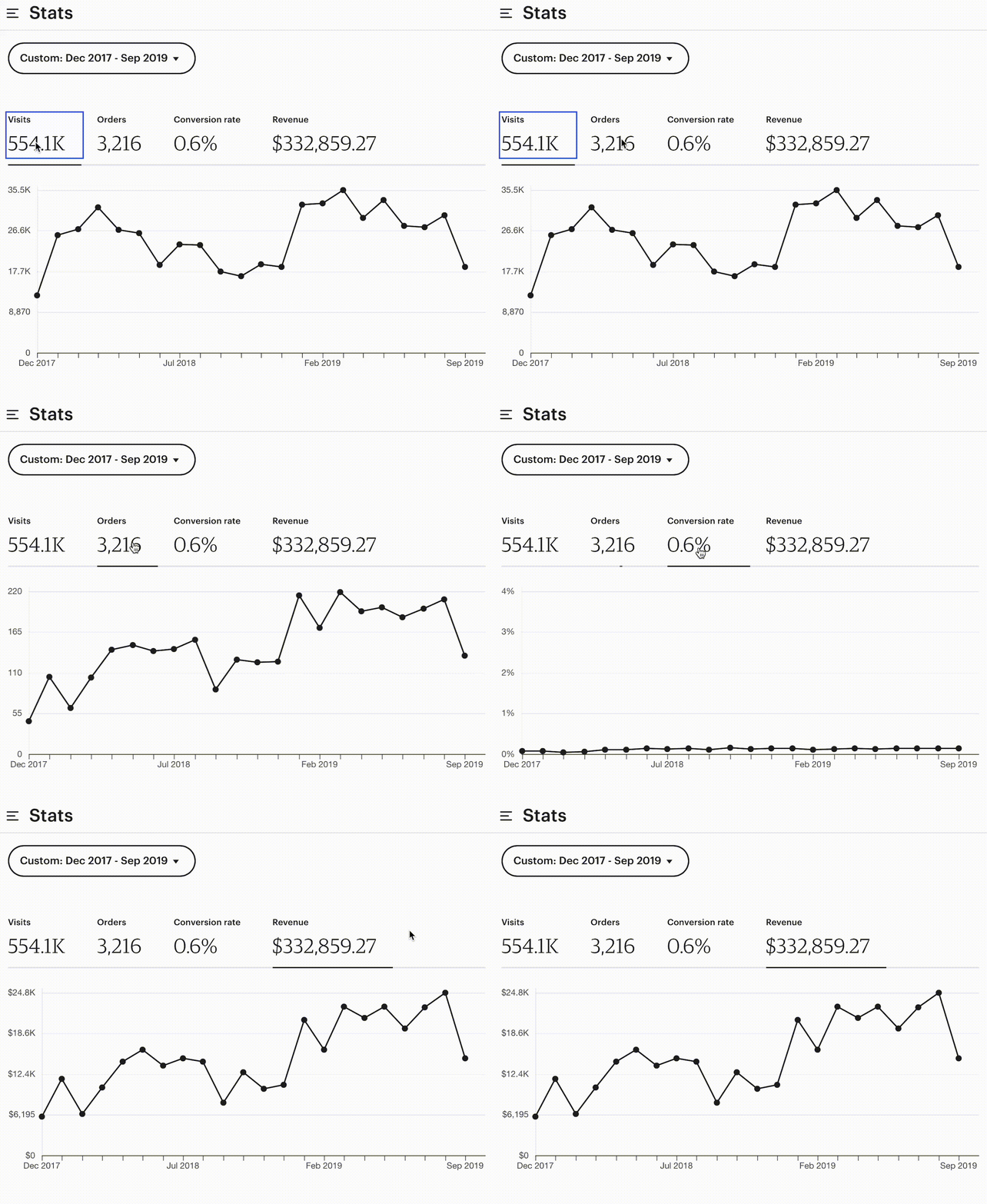
Optimizing your listings with etSEO leads to increased visibility on these e-commerce platforms, helping more potential buyers find your products. More views mean more opportunities for sales, driving the growth of your shop with every optimized listing.
Shop Owner Spotlight
Frances Spent $1 and Made $6000 With etSEO!
Results vary by niche, effort and market. No financial guarantees.
Choose the plan that matches your shop stage.
Start small, optimize your best products, then scale as your shop grows across Etsy, Shopify, and other e-commerce platforms.
Free
For testing the tool
Get a feel for how etSEO helps turn basic product details into optimized listing content.
- Includes 1 FREE optimized listing
- Explore etSEO tools
- Test listing optimization
- Perfect for brand-new sellers
- No pressure while you learn the platform
Starter
For newer shops
Best for sellers who want to optimize a small batch of products and start building better listing foundations.
- Optimize up to 5 listings per month
- Generate stronger titles, tags, and descriptions
- Improve listing clarity for Etsy search
- Great for validating your first products
Pro
For active sellers
Best for sellers with an active shop who want to clean up, test, and improve their most important listings.
- Optimize up to 10 listings per month
- Refresh underperforming products
- Test stronger keyword positioning
- Ideal for Etsy sellers building traction
Expert
For growing shops
Best for sellers ready to optimize more of their catalog, reposition products, and expand beyond one platform.
- Optimize up to 25 listings per month
- Reposition listings for different buyers
- Support multi-platform product growth
- Best for Etsy, Shopify, and e-commerce expansion
One Click Closer to Consistent Etsy Sales.
etSEO transforms your Etsy shop with optimized product titles, descriptions, and tags, powered by proprietary SEO strategies that drive more visibility, traffic, and sales
Why Choose etSEO?
Advanced SEO Technology
etSEO combines our proprietary SEO methodology and actionable keyword insights to go beyond basic optimization. Our tool dives deep into data, enhancing your listings with keywords that are not only high in volume but also strategically chosen for conversion potential and market relevance.
Streamlined Listing Management
With etSEO, you get a comprehensive listing optimization platform that simplifies your workflow. Our user-friendly dashboard allows you to manage SEO recommendations in one place, generating optimized titles, descriptions, and tags effortlessly with our custom SEO templates.
Optimized for Modern Platforms
Designed for mobile-first environments, etSEO ensures that your product descriptions are easy to read on any device. This feature aims to engage more buyers and keep your listings attractive and effective, whether viewed on a desktop or a smartphone.
Proof That etSEO Works
See how real Etsy sellers used etSEO to go from hidden gem to best seller – fast.
Results vary by niche, effort and market. No financial guarantees.
Hey!! The SEO software works! I bought the $1 trial and used it on a listing! I cant keep that listing in stock now!
I also bought more SEO listings and I update all my listing on December 30 so Im excited to see what happens with them.
Frances Robinson

I am amazed! I just thought I would give some feedback. One of the very first listings I created with the tool already has 16 orders! I hadn't given the stats much thought because I thought it would be too soon to see results.
October is notoriously slow for me but this year we are up 25% over last October.
Thank you again for this amazing tool. It's a game changer.
Cindy Miller
I know etSEO is a separate company, so let me know if I should post elsewhere about this. But I used the software to create a new Monster Truck Party Favor listing for my shop. The software is addictively-fast, and I have been able to post a few listings since the launch of this tool, which is a real game-changer! Listings take me forever.
Long story short: I listed the Monster Truck Favors 2 days ago, and since then Ive had 2 customers purchase a combined 22 favors!
Kristin R
Frequently Asked Questions
Everything you need to know about etSEO — from getting started to plans, credits, and billing.
Getting Started with etSEO
etSEO is your AI-powered tool built specifically to help you, as an Etsy seller, optimize your listings for higher visibility and sales. Instead of spending hours guessing keywords or rewriting descriptions, etSEO generates SEO-friendly titles, tags, descriptions, and alt text, all tailored to Etsy’s search algorithm.
Our goal is simple: save you time while helping your products get discovered, clicked, and purchased.
etSEO combines AI with Etsy’s search algorithm to make your listings stand out and attract more buyers. Here’s the simple walkthrough process:
- Connect or Upload — Pull in your existing Etsy listings (active, draft, expired, sold out, or inactive) using Store Optimizer, or start a brand new one by selecting Create New Listing inside etSEO.
- Upload Your Main Image (for new listings) — This helps the etSEO bot understand what you’re selling.
- Chat With the Bot (for new listings) — Answer a few quick product related questions so we can generate accurate, tailored SEO metadata.
- Generate Optimized Content — etSEO creates SEO friendly titles, tags, descriptions, and alt text based on Etsy’s algorithm and proven success data.
- Push to Etsy — Updates to active listings remain live in Etsy, while draft, expired, inactive, or sold out listings are pushed into Etsy as drafts for you to review and publish.
In short: etSEO handles the heavy lifting of SEO while letting you focus on creating and selling.
Create New Listing: Best for launching brand new products. You’ll chat with the bot, answer product specific questions, and provide context so the metadata is tailored to your item. This ensures highly personalized SEO.
Store Optimizer: Best for existing listings (active, draft, expired, sold out, inactive). This tool is designed for fast, direct updates without the conversation. It uses proven SEO data from successful sellers to quickly refresh your listings with optimized metadata.
Sellers often use both: Create New Listing for new products, Store Optimizer for quick improvements to existing ones. Prefer to watch? See the video walkthrough in the Watch & Learn section below.
Yes, etSEO is built to stay aligned with Etsy’s algorithm and best practices. We constantly update our system as Etsy evolves to ensure your listings remain optimized.
For example, when Etsy released updates about titles, they suggested sellers “consider shorter titles under 15 words.” However, Etsy did not reduce the title character limit or penalize longer titles. Because of this, etSEO continues to generate keyword rich titles that make the most of the available space, since real seller data shows that full, optimized titles consistently drive more traffic and sales.
Our approach is simple: whenever Etsy introduces new guidelines, we carefully test, review performance data, and update etSEO only if it helps sellers achieve better results.
No, we don’t recommend it. That tool is still in beta and can overwrite your existing SEO, potentially hurting well performing listings. etSEO gives you control with optimized updates while preserving what already works.
Watch & Learn: etSEO Tutorials
See how Add New Listing works compared to Store Optimizer — and exactly how Add New Listing creates a brand-new draft ready to review and publish to Etsy.
A full walkthrough of the etSEO workflow: generate optimized SEO, review the results, make any edits, save your changes, and push the finished listing straight to Etsy.
Already have listings live on Etsy? Watch how to use Store Optimizer to quickly refresh and improve an existing listing with optimized metadata.
A quick side-by-side of Store Optimizer and Create New Listing so you know which tool to reach for — refreshing existing products versus launching brand-new ones.
Step-by-step on linking your Etsy shop to etSEO — plus how to disconnect and reconnect it any time you need to.
Plans, Credits & Billing
The Expert Annual Plan gives you advanced optimization strategies, plus a free Etsy Seller Starter Bundle ($526 value) that includes coaching sneak peeks, financial/workbook tools, marketing calendars, product design guides, and more to help you scale your shop.
We’ve improved how listing updates work in Version 2. Instead of relying on regenerations (which could overwrite your listing and cause sync issues), you’ll now have direct editing control.
This means you’ll soon be able to:
- Update just the title if you want to test a new angle
- Customize your description to match your shop’s voice or template
- Fine tune your tags for even better targeting
So rather than regenerating whole versions, you get precise control over each part of your listing, a safer, smarter way to optimize without starting over.
Yes, any unused Pay as You Go listings from Version 1 are still valid and can be used. They remain active for 12 months from the date of purchase, even though Version 2 now runs entirely on subscriptions.
This means you won’t lose what you already paid for. You can continue using your remaining Pay As You Go listings until they expire.
Unfortunately, once all your Pay as You Go credits are used or expired, you will no longer be able to purchase that same plan again. With Version 2, our model has fully transitioned to subscriptions only.
The reason for this change is that subscriptions provide sellers with continuous access to all features, direct Etsy integration, and ongoing updates. This way, your shop is always supported with the latest optimizations and tools, and you can focus on growth without needing to repurchase individual credits.
Yes, but they work differently.
Pay As You Go (Version 1): You purchased a set number of listings upfront, and those credits lasted 12 months from the purchase date. Once used or expired, they were gone.
Subscriptions (Version 2): Your listings refresh every billing cycle (monthly or annually). That means each month (or year, if you’re on an annual plan) you get a new set of listings to use. Any unused listings do not roll over, they reset at the start of the next billing cycle.
If you use up all of your listings for the current billing cycle, you’ll need to wait until your subscription resets on the next billing date to receive a fresh set.
If you regularly run out of listings, we recommend upgrading to a higher subscription tier (Starter, Pro, Expert) so you always have enough credits to cover your shop activity. This way, you’re not limited mid month and can keep optimizing as your shop grows.
If you run out of listings before your subscription resets, you have two options:
- Upgrade your plan — Moving to a higher tier (Starter, Pro, Expert) instantly unlocks more listings so you don’t have to wait until your next billing date.
- Wait for your cycle to refresh — On your renewal date, your subscription automatically resets and you’ll get a new set of listings.
Right now, Version 2 does not support Pay As You Go top ups, so upgrading is the fastest way to get more listings if you need them immediately.
Version 2 no longer supports Pay as You Go top ups. That means if you run out before your cycle renews, you’ll need to either:
- Wait for your subscription to reset on your next billing date (your listings refresh automatically), or
- Temporarily upgrade to the next tier if you absolutely need more listings right away, then downgrade again before your next billing cycle if you don’t need the higher count every month.
This way, you’re not locked into a bigger plan permanently, you only upgrade if and when you really need the extra listings.
With Version 2, listings refresh automatically on your billing date. If you’ve already used your monthly allowance, you’ll need to wait until your next cycle for a fresh set of listings.
At this time, we don’t offer one off top ups for the same plan level. The only way to get more listings immediately is to temporarily upgrade to a higher tier. If you don’t actually need the higher plan long term, you can downgrade back to your current plan before the next billing cycle starts.
This way, you keep your usual plan month to month, but you still have the flexibility to grab extra listings when you really need them.
Listing Management (Create New Listing): A credit is deducted when you click Add New Listing and then confirm by clicking Create New Listing.
Store Management (Store Optimizer): A credit is deducted when you click Optimize on an existing listing.
No questions match your search — try a different keyword.
Still have questions?
Our team is happy to help — reach us any time at [email protected].
Start My FREE Trial© etSEO 2026 All Rights Reserved.